
My home lab is a hands-on extension of my work as a Cloud Solution Architect — a place where I can break things safely, learn new technologies before recommending them to clients, and run the self-hosted services I actually use day to day. It’s grown steadily from a few VMs into a full-stack environment spanning virtualization, containerized services, storage, observability, AI infrastructure, and hybrid connectivity into Azure.
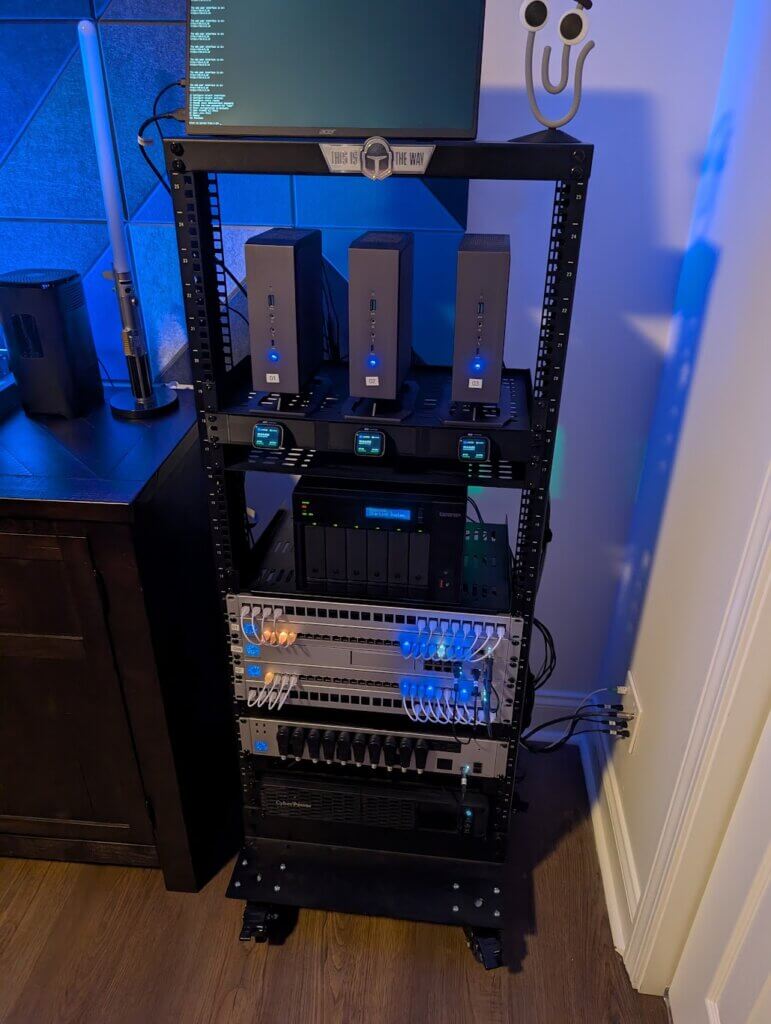
Network
The network runs on Ubiquiti, with a Cloud Gateway at the core handling routing, firewall, and VLANs. The lab is segmented to keep workloads isolated — management traffic, IoT, trusted devices, and lab VMs don’t share the same broadcast domain.
The lab has a live site-to-site VPN tunnel into my Azure Virtual Network via an Azure Virtual Network Gateway, which means on-premises workloads can reach Azure resources over private IPs without touching the public internet. Azure Private Endpoints and DNS Private Resolver are layered on top to keep service traffic fully private end-to-end.
Compute
I’ve ran VMware vSphere for many, many years. For a change of scenery, switched virtualization platforms to Proxmox VE. It’s a 3 node cluster using Ceph storage, it hosts a mix of Windows Server VMs (Active Directory Domain Controllers, DNS), Linux VMs, and the supporting infrastructure for everything else in the stack. The domain controllers also serve as the custom DNS servers for the Azure VNet, providing the Conditional Forwarder configuration that bridges on-prem DNS resolution with Azure’s private DNS zones. This lets me play with the same environments as my enterprise customers.
Storage
Storage is handled by TrueNAS, which provides NFS and SMB shares to the Proxmox cluster and serves as the host for several containerized workloads including the AI agent stack. Dataset layout follows a tiered approach — critical config data, media, and backups are kept separate.
Containers & Reverse Proxy
Container workloads run under Docker managed by Portainer, with Traefik handling reverse proxy and automatic TLS certificate management for self-hosted services. Traefik’s dynamic configuration picks up containers automatically via Docker labels, so spinning up a new service and having it accessible over HTTPS is a two-line config change.
Self-Hosted Services
A growing stack of self-hosted tools:
- n8n — workflow automation and integration orchestration
- Home Assistant — home automation and device management
- Grafana — dashboards and visualization, part of the LGTM+ observability stack
- Loki — log aggregation
- Prometheus — metrics scraping across the infrastructure
- Portainer
- Dozzle
- NextCloud
- Paperless-ngx
- Semaphore
- Tailscale
- Unpoller
- Uptime-Kuma
AI & Automation Infrastructure
I’m learning and deploying a local AI stack centered on Ollama & LM Studio as the primary LLM backend, with OpenClaw providing a multi-agent orchestration layer. Agents are purpose-built for specific roles — TACITUS handles infrastructure queries (Proxmox, TrueNAS, Prometheus integrations) and SCRIBE handles documentation generation.
MCP (Model Context Protocol) servers are self-hosted via Portainer using HTTP/SSE transport, making them accessible to multiple clients simultaneously — Claude.ai, Claude Code, Cursor, and VS Code can all connect to the same MCP server instances without separate deployments per client.
Hybrid Cloud
The lab doesn’t exist in isolation — it’s deliberately connected to Azure. The site-to-site VPN, Private Endpoints, and DNS configuration mean the homelab effectively functions as an on-premises extension of an Azure VNet. This mirrors real enterprise hybrid architectures and gives me a realistic environment for validating Azure connectivity and networking patterns before recommending them at work.