
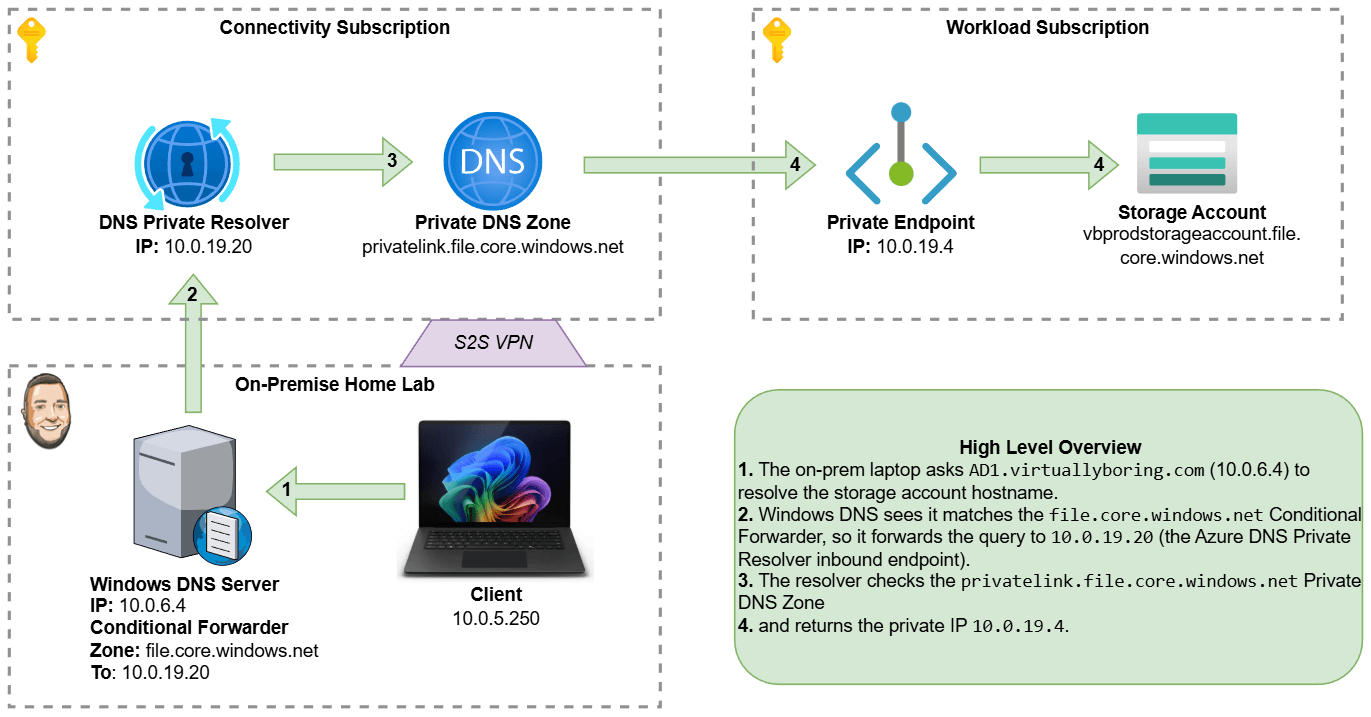
By default, most Azure services — storage accounts, key vaults, SQL databases, you name it — are reachable over the public internet. That’s fine for a quick lab, but not great when you want your on-premises workloads to talk to Azure resources without any of that traffic ever leaving your private network.
Prerequisite: This walkthrough assumes you already have a VPN tunnel between your on-premises network and your Azure VNet. If you haven’t set that up yet, check out my guide on Deploying an Azure Virtual Network Gateway first.
That’s where Private Endpoints come in. A Private Endpoint drops a Network Interface Card (NIC) directly inside your Virtual Network, giving your Azure resource a private IP address that’s only reachable from within your network. No public internet required.
The catch? DNS. Your on-premises DNS servers still resolve that storage account’s hostname to its old public IP. We need to teach them to ask Azure’s private DNS instead. To bridge that gap we’ll use Azure’s DNS Private Resolver — a fully managed, serverless DNS forwarder that lives inside your VNet — and then configure a Conditional Forwarder on your Windows DNS server to point traffic for Azure domains at it.
Here’s what we’re building end-to-end:
- Create a Private Endpoint for an Azure Storage Account (file share).
- Create a DNS Private Resolver with an inbound endpoint so on-prem DNS can reach it.
- Configure a Conditional Forwarder in Windows DNS to send
*.file.core.windows.netqueries to that resolver.
Environment note: In this walkthrough I use a storage account as the example resource, but the same pattern applies to any Azure service that supports Private Link (Key Vault, SQL, App Service, etc.). Only the resource type and DNS zone name change.
There are multiple scenarios for using these services. The scenario I am deploying is called Azure Private Resolver for virtual network and on-premises workloads. Check that link for additional scenario types!
Let’s jump in!