
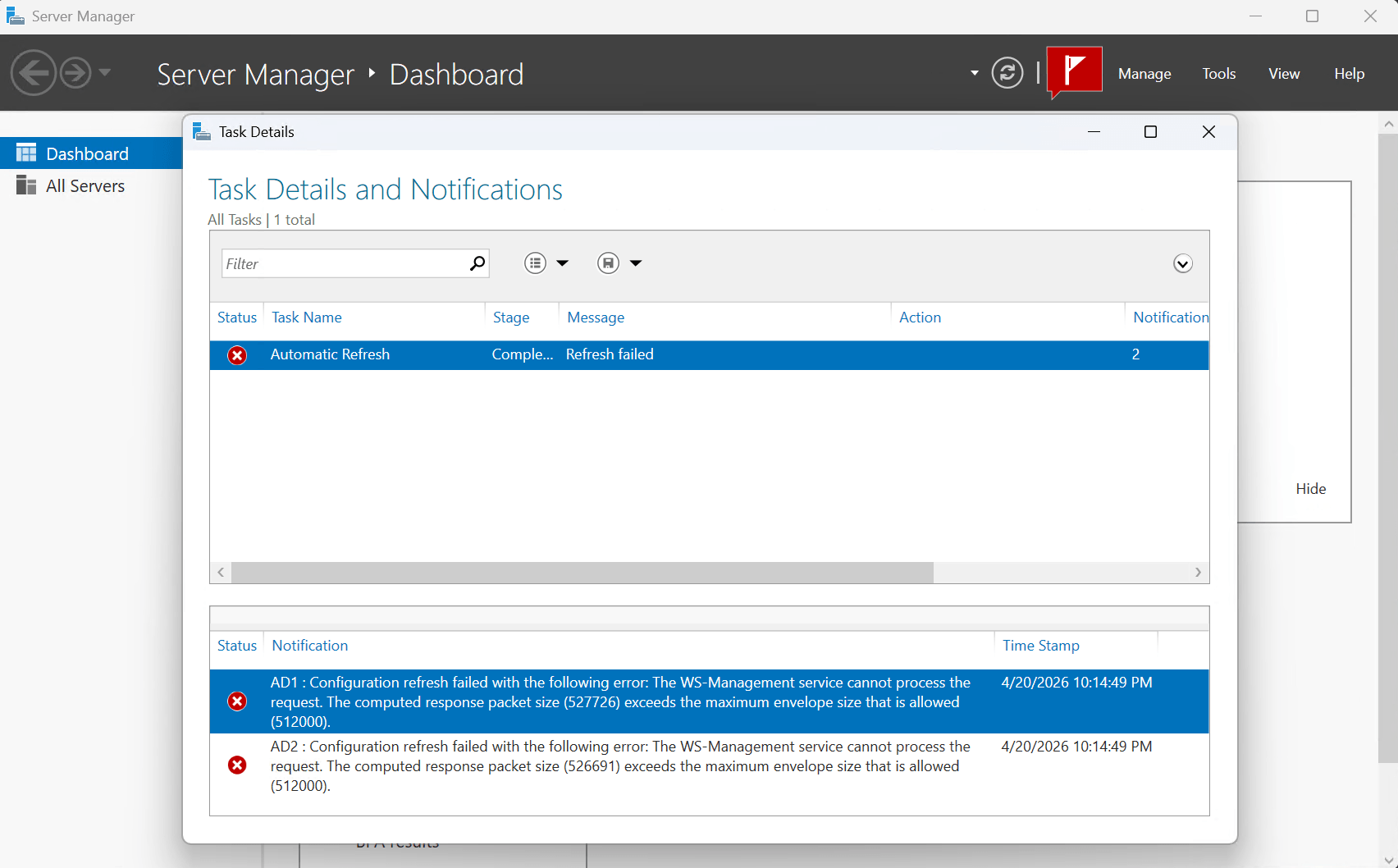
I installed Server Manager on my laptop to make it easier to manage my Active Directory Domain Controllers remotely. When I added two of my domain controllers I got the following error message:
Configuration refresh failed with the following error: The WS-Management service cannot process the request. The computed response packet size (527726) exceeds the maximum envelope size that is allowed (512000).
After some searching I discovered that the response the server tried to send back was bigger than WinRM was allowed to carry. The management tool asked for a configuration refresh, the server started building the response, and WinRM threw it in the trash before it ever arrived.
Why It’s Happening
WS-Management (WinRM) communicates using SOAP over HTTP — basically XML envelopes sent back and forth. There’s a setting called MaxEnvelopeSizekb that caps how large any single response envelope can be. Out of the box, that limit is 512 KB (512,000 bytes).
The problem is that as your environment grows — more AD objects, more roles, more configuration data — the payload for a full configuration refresh eventually exceeds that cap. The two domain controllers I added were returning 527 KB and 526 KB respectively. Close, but just over the line, and WinRM doesn’t negotiate. It just refuses.
This is especially common on Domain Controllers with large Active Directory configurations, or any server that has accumulated a lot of roles, features, and policies over time.
The Fix
The fix is to raise MaxEnvelopeSizekb on the affected servers. There is no official Microsoft-recommended value — the right number depends on your environment. Two sensible approaches:
Right-size to just above the failure point — if the error reports a packet of 527,726 bytes (~516 KB), setting the limit to 600–700 KB resolves the issue with minimal overhead. This is the conservative approach: increasing MaxEnvelopeSizekb carries a tradeoff in that larger envelope sizes increase memory and processing overhead per WinRM request. Increase only as much as needed.
Use a higher baseline (1024 KB+) for environments where payloads are large or unpredictable — busy Domain Controllers, Exchange servers, systems with many accumulated roles and features, or anywhere you want headroom to grow. In my case I chose 1024 KB for that reason, but it’s a pragmatic call, not an official standard.
Here are the three ways to apply the change:
Option 1 — Run directly on the affected server (quickest):
# Check your current value first
winrm get winrm/config

# Raise the limit to 1024 KB
winrm set winrm/config '@{MaxEnvelopeSizekb="1024"}'Code language: PHP (php)
Option 2 — PowerShell WSMan provider (same result, different syntax):
Set-Item -Path WSMan:\localhost\MaxEnvelopeSizekb -Value 1024Code language: JavaScript (javascript)Option 3 — Group Policy (recommended for domain environments):
If you have multiple servers hitting this, push it via GPO so it’s consistent and self-healing:
Computer Configuration → Administrative Templates → Windows Components → Windows Remote Management (WinRM) → WinRM Service → "Specify maximum envelope size" → Set to 1024Code language: JavaScript (javascript)Note: There is no single Microsoft-recommended value for
MaxEnvelopeSizekb. Start just above your failing packet size for a minimal footprint, or use 1024–2048 KB for heavier workloads. Keep in mind that increasing this limit raises memory and processing overhead per WinRM request — increase cautiously and only as much as the environment requires.
After applying the change, I triggered another configuration refresh on both servers and they came back clean.
Closing Thoughts
This one caught me off guard at first — the error message doesn’t make it obvious that the fix is a configuration change. Once I understood what WinRM was actually complaining about, it took about two minutes to resolve. The 512 KB default is a low ceiling that environments can quietly outgrow — especially as Active Directory scales up or more roles accumulate on a server over time.
The main thing I’d emphasize for anyone hitting this in production: right-size the value rather than defaulting to an arbitrary round number. Capture the actual failing packet size from the error message, add some headroom, and only go higher if the issue recurs.
If you’re hitting this on multiple servers, the GPO route is worth the few extra minutes — you won’t have to think about it again as your environment continues to grow.
I dont see a “Specify maximum envelope size” setting in the Computer Configuration → Administrative Templates → Windows Components → Windows Remote Management (WinRM) → WinRM Service section.
Has this been renamed to something else in newer GPO templates?